

open_camera_stream()
This command opens a camera windows on the fleet manager so it can be rotated and see a streaming of the camera selected.
Reference
Argument
Arguments |
Type |
Default value |
Description |
|---|---|---|---|
title |
|
Title of the window |
|
button_ok_txt |
|
Text of the ok button |
|
subtitle |
|
’’ |
Subtitle of the window |
default_camera |
|
’’ |
Name of the camera to show |
button_cancel_txt |
|
’’ |
Text of the cancel button |
Return
Dict
Exceptions
TypeError
Usage Example
from raya.application_base import RayaApplicationBase
from raya.controllers.fleet_controller import FleetController
from raya.enumerations import *


class RayaApplication(RayaApplicationBase):

    async def setup(self):
        self.fleet: FleetController = await self.enable_controller('fleet')
        await self.fleet.update_app_status(
                status=FLEET_UPDATE_STATUS.INFO,
                message='setup ok'
            )

    async def loop(self):
        response = await self.fleet.open_camera_stream(
            title='stream from camera',
            button_ok_txt='Ok',
            default_camera='nav_bottom'
        )
        self.log.info(f'open_camera_stream response: {response}')
        self.finish_app()

    async def finish(self):
        await self.fleet.finish_task(
            result=FLEET_FINISH_STATUS.SUCCESS,
            message='finish ok'
        )
Once the task is executed you should see this on the fleet manager
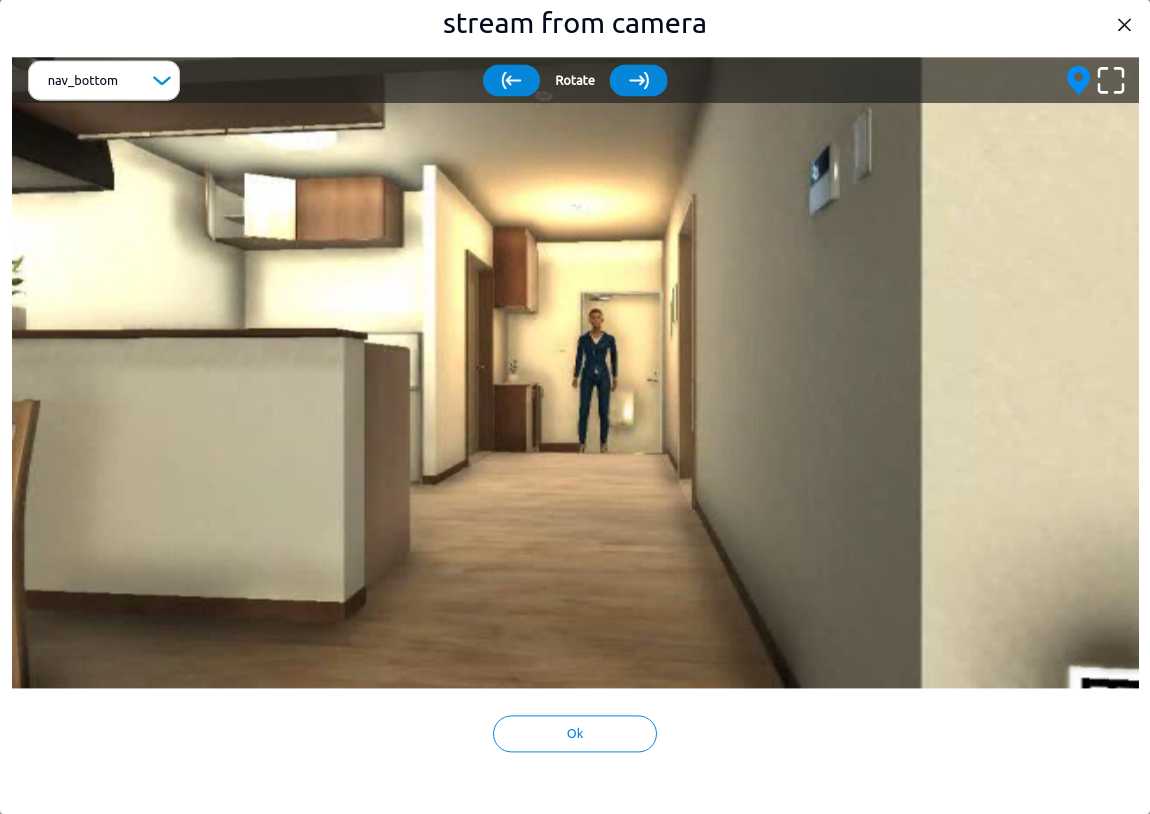
In case that the user clicks ok i will send that response to the app, in our example it will show the respose
(INFO) open_camera_stream response: {'data': 'Ok'}